
 Grafana Cloud
Monitor applications
Frontend Observability
Configure
Source map uploads
Upload with bundlers
Grafana Cloud
Monitor applications
Frontend Observability
Configure
Source map uploads
Upload with bundlersUpload source maps with bundlers
Configure Webpack, Rollup/Vite, or esbuild bundlers to automatically upload source maps to Grafana Cloud during builds.
Note
The source map upload endpoint differs from the Faro Collector endpoint. Use the endpoint shown in Frontend Observability > Settings > Source Maps > Configure source map uploads.
Faro bundler plugins support client-side rendered applications only. Server-side rendering isn’t supported. Next.js client-side apps may need _next/ path adjustments using the nextjs option.
Webpack plugin
npm install --save-dev @grafana/faro-webpack-pluginor
yarn add --dev @grafana/faro-webpack-pluginRollup/Vite plugin
npm install --save-dev @grafana/faro-rollup-pluginor
yarn add --dev @grafana/faro-rollup-pluginEsbuild plugin
Note
The esbuild plugin is currently experimental. While it provides feature parity with the rollup and webpack plugins, it may have issues or limitations. Report any problems you encounter.
npm install --save-dev @grafana/faro-esbuild-pluginor
yarn add --dev @grafana/faro-esbuild-pluginObtain an API key
To use the Faro JavaScript bundler plugins, you must generate a token for the API key value with the necessary permissions to upload source maps to Grafana Cloud. To generate a token, follow these steps:
- Navigate to the Grafana website.
- Sign in to your account and then click My Account in the top right corner.
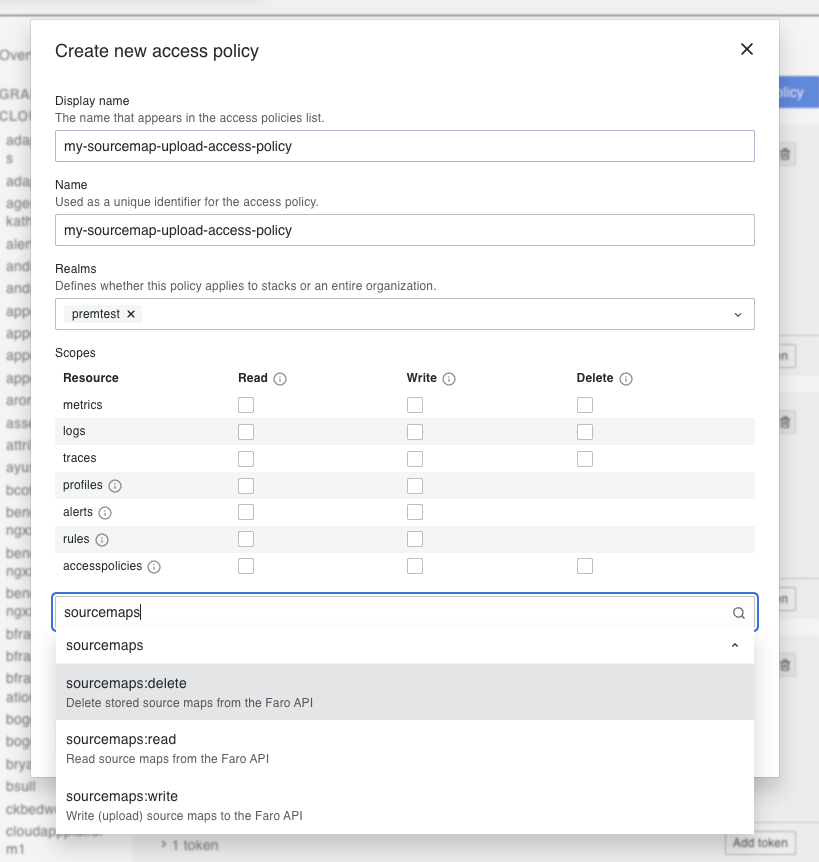
- In the sidebar under Security, click Access Policies and then click Create access policy.
- Select the
sourcemaps:read,sourcemaps:delete, andsourcemaps:writescopes from the drop-down list. - After creating your access policy, click Add token in the card for your newly created policy.
- Create the token and be sure to copy the token value, as you won’t be able to see it again.
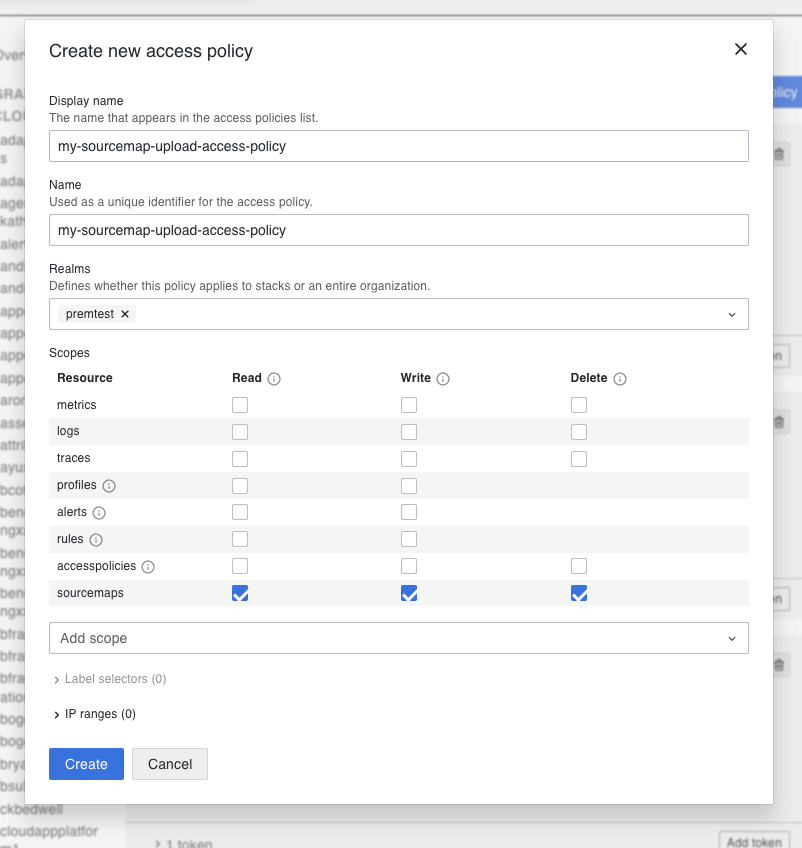
After you have generated a token with the API key value, you can use it in the Faro JavaScript bundler plugins to upload your source maps to Grafana Cloud. Use the generated token value as the apiKey value in the configuration options for the bundler plugins.
For best practices, store your token in a secure location and don’t expose it in your source code. Consider using environment variables or a secrets manager to securely store and access your API key.
Webpack configuration
Add the plugin to your webpack.config.js:
// other imports
import FaroSourceMapUploaderPlugin from '@grafana/faro-webpack-plugin';

module.exports = {
  // other configs
  plugins: [
    // other plugins
    new FaroSourceMapUploaderPlugin({
      appName: '$your-app-name',
      endpoint: '$your-faro-sourcemap-api-url',
      apiKey: '$your-api-key',
      appId: '$your-app-id',
      stackId: '$your-stack-id',
      gzipContents: true,
      // Set skipUpload: true to upload later with CLI
      // skipUpload: true,
    }),
  ],
};
Rollup/Vite configuration
Add the plugin to your rollup.config.js or vite.config.js:
// other imports
import faroUploader from '@grafana/faro-rollup-plugin';

export default defineConfig(({ mode }) => {
  return {
    // other configs
    plugins: [
      // other plugins
      faroUploader({
        appName: '$your-app-name',
        endpoint: '$your-faro-sourcemap-api-url',
        apiKey: '$your-api-key',
        appId: '$your-app-id',
        stackId: '$your-stack-id',
        gzipContents: true,
        // Set skipUpload: true to upload later with CLI
        // skipUpload: true,
      }),
    ],
  };
});
Esbuild configuration
Add the plugin to your esbuild build script:
Note
The esbuild plugin automatically injects a
fileproperty into each source map during the build, even whenskipUpload: trueis set. This is required for Grafana to correctly match source maps to JS chunks when de-obfuscating stack traces.Angular applications are commonly affected by this because Angular’s default esbuild builder does not include the
filefield in generated source maps. If you upload source maps separately via the Faro CLI, use this plugin withskipUpload: trueto ensure thefilefield is set before upload.
import * as esbuild from 'esbuild';
import faroEsbuildPlugin from '@grafana/faro-esbuild-plugin';

await esbuild.build({
  entryPoints: ['src/index.ts'],
  bundle: true,
  outdir: 'dist',
  plugins: [
    faroEsbuildPlugin({
      appName: '$your-app-name',
      endpoint: '$your-faro-sourcemap-api-url',
      apiKey: '$your-api-key',
      appId: '$your-app-id',
      stackId: '$your-stack-id',
      gzipContents: true,
      // Set skipUpload: true to upload later with CLI
      // skipUpload: true,
    }),
  ],
});
Configuration options
Configure bundler plugins with these options:
Required options:
appName: string- Application name that matches your Faro Web SDK configurationendpoint: string- Source map API endpoint from Frontend Observability > Settings > Source Maps > Configure source map uploadsapiKey: string- API key withsourcemaps:read,sourcemaps:write, andsourcemaps:deletescopesappId: string- Application ID that matches your Faro Web SDK configurationstackId: string- Grafana Cloud stack ID
Optional options:
outputPath: string- Override output directory path for source maps. Uses bundler output path by defaultoutputFiles: string[] | RegExp- List of source map files or regular expression pattern to match. Uploads all source maps by defaultbundleId: string- Bundle/build ID. Auto-generated by defaultgitHash: string- Git commit hash to inject into the bundle. Resolved in order: explicit value →git rev-parse HEAD. Use this option to provide an explicit value when auto-detection won’t pick the right SHA (for example, multi-stage Docker builds without.git, or GitHub Actionspull_requestevents whereHEADis a synthetic merge commit). If neither resolves, no git hash is injectedkeepSourcemaps: boolean- Keep source maps in generated bundle after uploading. Default:falsegzipContents: boolean- Compress source maps before uploading. Default:trueverbose: boolean- Enable detailed logging during upload. Default:falseskipUpload: boolean- Skip uploading during build and export bundle ID to environment file. Default:falsemaxUploadSize: number- Maximum upload size in bytes for single batch. Default: 30MBrecursive: boolean- Recursively search subdirectories for source maps. Default:falsenextjs: boolean- Webpack only. Prepend_next/to file properties for Next.js compatibility. Only needed when your Next.js application has both client and server side code. If bothprefixPathandnextjsare provided, they are combined as${prefixPath}/_next/. Default:falseproxy: string- Proxy URL to route source map uploads through. Supports HTTP and HTTPS proxies. Include credentials in the URL if authentication is required:http://username:password@proxy.example.com:8080prefixPath: string- Prefix to prepend to thefileproperty in source maps. Useful when files in the browser appear in a different path hierarchy than the bundler is aware of (for example, when using a CDN where stack traces showcdn/index.jsbut the source map only showsindex.js)prefixPathBasenameOnly: boolean- Whentrue, strips any directory path from the source mapfileproperty before prependingprefixPath, keeping only the filename. Useful when assets are deployed flat to a CDN with no subdirectory structure. For example, if the source map’sfileisassets/index.jsandprefixPathishttps://cdn.example.com/assets/, this produceshttps://cdn.example.com/assets/index.jsinstead ofhttps://cdn.example.com/assets/assets/index.js. Only applies whenprefixPathis set. Default:false
Link errors to commits (Suspect Commits)
The Suspect Commits feature in Frontend Observability surfaces the Git commit most likely responsible for an error on the error summary page, so you can jump from a stack trace to a candidate fix without leaving Grafana. Enabling commit hash injection adds a directly recorded signal: when an error first appears, the SDK reports the build’s SHA, and Suspect Commits pins that commit at the top of the candidate list.
To enable this, the bundler plugin injects the current commit hash into your built JavaScript at build time, the Faro Web SDK reads it, and includes it as meta.app.gitHash on every telemetry payload.
Note
The Faro Web SDK transmits the injected commit hash to Grafana Cloud as part of Faro telemetry and stores it with the error’s first-seen record. If you operate in a regulated industry or your repository is proprietary, review your organization’s data-handling policies before enabling this feature.
Minimum versions:
@grafana/faro-web-sdk(and@grafana/faro-react): 2.7.0- Bundler plugins:
@grafana/faro-webpack-plugin0.12.0,@grafana/faro-rollup-plugin0.11.0,@grafana/faro-esbuild-plugin0.6.0,@grafana/faro-metro-plugin0.2.0 - CLI (for post-build injection):
@grafana/faro-cli0.10.0
The bundler plugin resolves the hash in this priority order:
- Explicit
gitHashvalue passed to the plugin - Auto-detected via
git rev-parse HEADat build time
If neither resolves, the plugin emits [Faro] Git hash could not be resolved to the build log and no hash is injected. The build still succeeds.
Auto-detection via git rev-parse HEAD:
When gitHash is not specified, the plugin runs git rev-parse HEAD during the build. This works for most local development environments and CI setups where the .git directory is present in the build context:
new FaroSourceMapUploaderPlugin({
  appName: '$your-app-name',
  endpoint: '$your-faro-sourcemap-api-url',
  // ...other required options
  // gitHash auto-detected from git rev-parse HEAD
});
Warning
Multi-stage Docker builds commonly exclude
.gitvia.dockerignore, which causes auto-detection to silently fail — the build succeeds but no hash is injected. Either keep.gitin the build context or setgitHashexplicitly (see below).
Explicit override:
Set gitHash explicitly when auto-detection won’t pick the right SHA:
- Multi-stage Docker builds, or any build context without access to
.git - GitHub Actions
pull_requestevents, wheregit rev-parse HEADandprocess.env.GITHUB_SHAboth resolve to a synthetic merge commit that doesn’t exist on any branch — to point at the PR head, pass${{ github.event.pull_request.head.sha }}through as an env var - Any environment where the desired SHA differs from the local checkout
new FaroSourceMapUploaderPlugin({
  appName: '$your-app-name',
  endpoint: '$your-faro-sourcemap-api-url',
  // ...other required options
  gitHash: process.env.FARO_GIT_HASH,
});
On GitHub Actions, expose the PR head SHA to the build step.
Use pull_request.head.sha so the injected SHA points at the PR head, not the synthetic merge commit GitHub creates for pull_request events:
- name: build
  env:
    FARO_GIT_HASH: ${{ github.event.pull_request.head.sha || github.sha }}
  run: yarn build
Post-build injection via the Faro CLI:
If you can’t run the bundler plugin at build time (for example, you ship pre-built artifacts produced elsewhere), the @grafana/faro-cli package exposes an inject-git-hash command that mirrors inject-bundle-id and patches the hash into existing JavaScript artifacts after the fact:
npx @grafana/faro-cli inject-git-hash \
  --app-name '$your-app-name' \
  --git-hash $(git rev-parse HEAD) \
  --files 'dist/**/*.js'
Refer to the faro-javascript-bundler-plugins repository for the full CLI reference.
Set gitHash directly in the Faro Web SDK configuration
If you don’t use the Faro bundler plugins, you can set app.gitHash directly when initializing the Faro Web SDK. Because browsers have no process.env, the commit SHA must be embedded into the bundle at build time:
1. Make the SHA available to the build:
For local builds:
export GIT_HASH=$(git rev-parse HEAD)For CI environments, use the appropriate environment variable:
- GitHub Actions:
export GIT_HASH=$GITHUB_SHA - Jenkins:
export GIT_HASH=$GIT_COMMIT - GitLab CI:
export GIT_HASH=$CI_COMMIT_SHA
2. Configure your bundler to inline it.
For Create React App and Next.js, no extra config is needed — they automatically inline prefixed env vars. Set REACT_APP_GIT_HASH (CRA) or NEXT_PUBLIC_GIT_HASH (Next.js) instead of GIT_HASH in step 1, and reference it directly as process.env.REACT_APP_GIT_HASH / process.env.NEXT_PUBLIC_GIT_HASH.
For Vite, no extra configuration is needed — Vite embeds import.meta.env.VITE_*. Set VITE_GIT_HASH in step 1 and reference it as import.meta.env.VITE_GIT_HASH.
For Webpack, use DefinePlugin:
// webpack.config.js
const webpack = require('webpack');

module.exports = {
  // ...
  plugins: [
    new webpack.DefinePlugin({
      'process.env.GIT_HASH': JSON.stringify(process.env.GIT_HASH),
    }),
  ],
};
For Rollup, use @rollup/plugin-replace:
// rollup.config.js
import replace from '@rollup/plugin-replace';

export default {
  // ...
  plugins: [
    replace({
      preventAssignment: true,
      'process.env.GIT_HASH': JSON.stringify(process.env.GIT_HASH),
    }),
  ],
};
For esbuild, use the define option:
// build.js
import * as esbuild from 'esbuild';

await esbuild.build({
  // ...
  define: {
    'process.env.GIT_HASH': JSON.stringify(process.env.GIT_HASH),
  },
});
3. Reference it in your Faro initialization:
import { initializeFaro } from '@grafana/faro-web-sdk';

initializeFaro({
  url: '$your-faro-collector-url',
  app: {
    name: '$your-app-name',
    version: '1.0.0',
    gitHash: process.env.GIT_HASH, // or import.meta.env.VITE_GIT_HASH for Vite
  },
  // ...other config
});
Only the meta.app.gitHash check below applies when using this approach. The bundler plugins set window.__faroGitHash_<app-name> only.
Verify the commit hash is captured
After a successful build, you can confirm the hash flows end-to-end:
- Build log: grep for
[Faro] Git hash could not be resolved— if the plugin couldn’t determine a SHA, this string appears in the build output. Its absence means the plugin resolved a hash successfully. - Bundle: open DevTools console on a page using the bundle and run
window.__faroGitHash_<your-app-name>— expect a 40-character SHA. (Bundler plugin path only.) - Telemetry: in the browser Network tab, inspect a Faro
/collectrequest —meta.app.gitHashshould be set on the payload.
If the hash is missing, the most common cause is a build context without .git (multi-stage Docker, .dockerignore excluding .git) — refer to the Explicit override section to set gitHash explicitly.
Verify source maps
After building your application, verify uploads in Frontend Observability by navigating to your app > Settings > Source Maps. If you set skipUpload: true, complete the upload using the CLI.
For troubleshooting common issues, refer to Troubleshooting.


